Best Invoicing App for Small Business: 2026 Picks
Compare the best invoicing apps for small businesses in 2026, including ProInvoice, FreshBooks, Square, Harvest and accounting alternatives.
ProInvoice is the best invoicing app for small business if you run a service-based business and need to turn approved estimates into invoices, then collect deposits and remaining balances online. You keep the job’s services, materials, quantities, and prices connected as you move from quoting work to requesting payment.
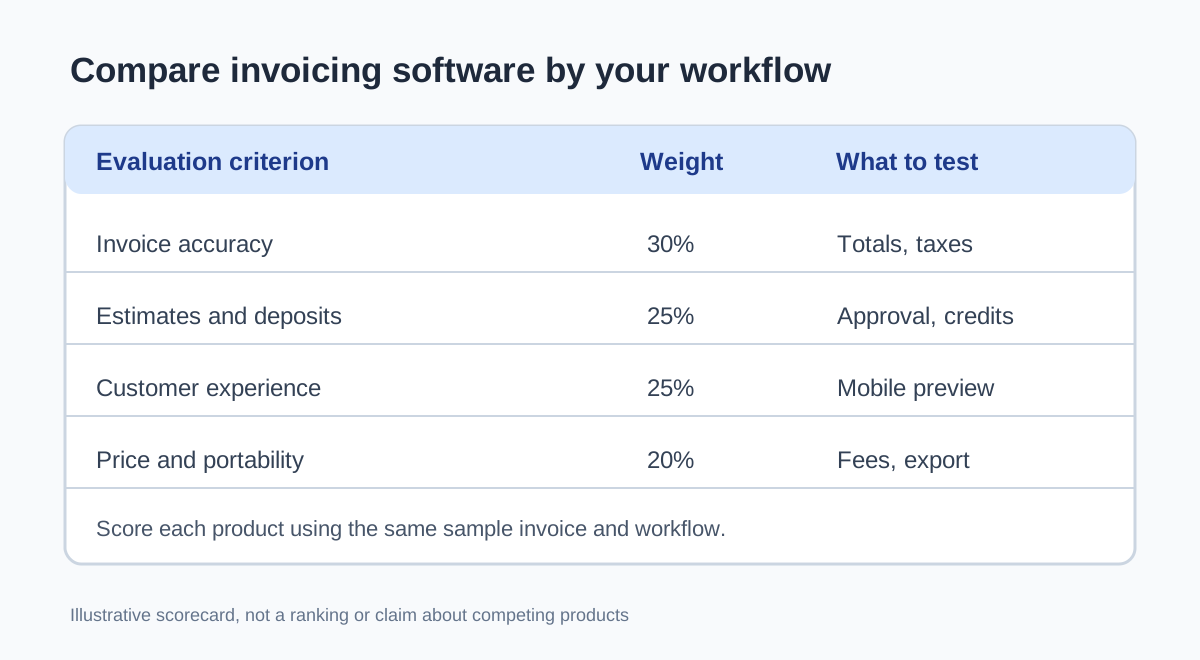
Your small business invoicing workflow should make the amount owed clear at every stage. For contractors and other service-based businesses, that means accounting for an upfront deposit and any approved changes before sending the final bill.
You also have worthwhile alternatives among invoicing apps for small businesses. FreshBooks suits time-and-expense billing, Square Invoices fits businesses accepting in-person payments, and accounting platforms deserve consideration when you want billing alongside your books.
Which Apps Fit Your Billing Workflow?
Your strongest shortlist starts with the source of your billable work: an estimate, tracked hours, a sale, or an accounting record. Compare the best invoicing apps for small business against the steps you repeat each week.
| Your comparison criteria | ProInvoice | FreshBooks | Square Invoices | Harvest |
|---|---|---|---|---|
| Billing starting point | Job estimate | Services and time | Customer sale | Tracked hours |
| Best-fit workflow | Quoted service work | Freelance projects | Sales and billing | Hourly projects |
| Priority to check | Deposit handling | Billable expenses | Payment reconciliation | Time approval |
| Selection focus | Estimate to payment | Project billing | Square ecosystem | Time to invoice |
ProInvoice: Estimates, Deposits, and Final Invoices for Service Work
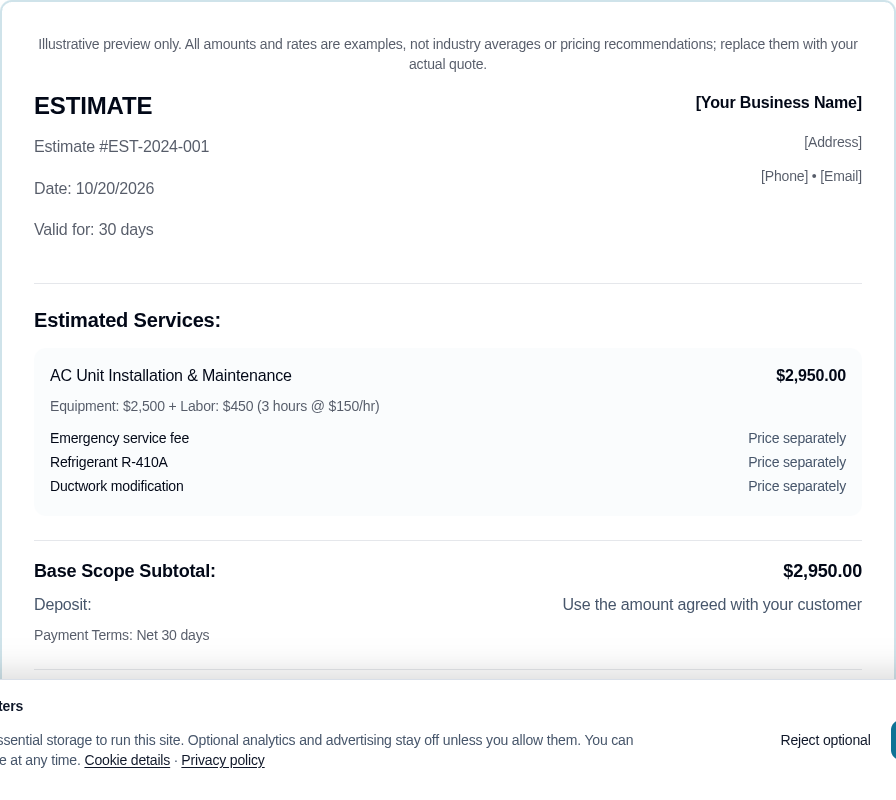
You get a focused estimate-to-payment workflow with ProInvoice. You create estimates containing customer details, services, materials, quantities, prices, and deposits, then turn approved estimates into invoices showing totals and payment terms.
You also get payment links for collecting deposits and remaining balances online with a connected payment account. Put ProInvoice on your shortlist when you quote plumbing, roofing, electrical, landscaping, or other service work and want to carry the agreed scope into billing.
FreshBooks: Invoicing With Time and Expense Tracking
You should consider FreshBooks when your invoices combine professional services with billable time or expenses. As a freelancer or small agency owner, you benefit from reviewing those inputs alongside your client billing.
During your evaluation, enter a timed task and a reimbursable expense, then prepare an invoice. Check which subscription supports your client count and collaborators, and confirm how you review billable entries before sending them to a customer.
Zoho Invoice and Wave: Options for Budget-Conscious Businesses
You have two useful budget-focused candidates in Zoho Invoice and Wave. Put Zoho Invoice on your shortlist for dedicated invoicing, and consider Wave when you also want accounting functions close to your billing records.
Review each vendor’s current free-plan terms before moving your customer list. Your comparison should cover invoice allowances, payment options, and the features included at no subscription charge, along with any paid upgrades you expect to need.
Square Invoices: Billing Alongside In-Person Sales
You should look closely at Square Invoices if you already accept in-person payments through Square. Keeping customer billing within the same payment ecosystem gives you a practical starting point for comparing administrative effort.
Create a Square invoice for a typical service sale and inspect the customer payment experience. Check how an invoice payment appears alongside your other sales and payouts, particularly if you collect money both at a counter and after completing work.
QuickBooks Online, Xero, and Zoho Books: Invoicing Within Accounting Software
You should shortlist QuickBooks Online, Xero, or Zoho Books when you want invoicing within accounting software. Your evaluation then includes bookkeeping requirements, such as bank reconciliation and financial reporting.
Ask your bookkeeper which platform fits your existing records. Test how you handle an invoice payment and its processing fee, then confirm the plan supports your billing volume and required access permissions. An accounting subscription deserves evaluation against your full financial workflow.
Harvest: Turning Billable Hours Into Invoices
You should consider Harvest when tracked time supplies most of your invoice detail. Your main evaluation task is checking how project hours become customer-facing charges.
Enter time under different projects or rates, then review the resulting invoice draft. Pay attention to how you exclude nonbillable work and describe billable hours. If you manage a team, verify the review process before those hours reach your customer.
PayPal Invoicing: An Option for Customers Who Prefer PayPal
You have a useful candidate in PayPal Invoicing when your customers already prefer paying through PayPal. Evaluate the invoice creation process alongside the payment experience your customers expect.
Send yourself a sample invoice and review the payment choices presented for your account and market. Before adopting it, check applicable commercial transaction fees, cross-border charges, and currency-conversion costs against the types of customers you bill.
Specialist Alternatives: Invoice Ninja, Bookipi, Invoicely, ZipBooks, and Invoicera
You can expand your shortlist with Invoice Ninja, Bookipi, Invoicely, ZipBooks, and Invoicera when you have a particular operational priority. Give each candidate one concrete requirement to meet, such as invoice customization, phone-based entry, or team billing controls.
Avoid evaluating five complete systems at once. Pick two candidates, create the same sample invoice in each, and compare the steps required. Verify current plan allowances and payment-provider compatibility before importing live records.
Which Features Matter for Everyday Billing?
Your everyday essentials are accurate invoice creation, convenient customer payment, and clear payment tracking. Add automation or project tools when they support work you already perform.
How Easily Can You Create and Send an Invoice From Your Phone?
Your mobile invoicing test should include a complete invoice, from selecting a customer to previewing the finished document. Use your own phone to check item entry, decimal quantities, tax fields, and payment terms.
Compare invoice templates for readability on a small screen. For client management, check how quickly you find the correct billing contact and service address. Record any fields you must reenter when billing an existing customer.
Can Customers View Invoices and Pay Online?
You want your customer to see the amount due and reach the payment step without confusion. Open the invoice as a recipient and follow its payment links through the available online payments flow.
If you need a client portal, check which documents and balances your customer sees after signing in. Also inspect your own payment tracking: distinguish an invoice that has been sent from one that has been paid, refunded, or partially settled.
Do You Need Recurring Invoices and Automated Reminders?
You need recurring invoices when you bill customers on an agreed schedule, such as monthly maintenance. Verify how the app handles changes to amounts and the end of a service agreement.
Treat recurring billing and automatic charging as separate capabilities during your review. For automated payment reminders, inspect the message timing and remaining-balance calculation. Your workflow automation should leave room to pause follow-ups when you are resolving a billing question.
When Do Time, Expense, and Project Tracking Matter?
You need time tracking when your charges depend on hours worked, and expense tracking when you pass eligible costs to customers. Project tracking becomes useful when several contributors or billing stages feed one engagement.
Test whether every billable entry retains a clear customer and project assignment. For fixed-price work, inspect how you compare internal costs with the agreed fee while keeping the customer’s invoice aligned with the approved scope.
Do You Need Accounting Integration or International Billing?
You need accounting integration when you want billing records to reach your books without repeated entry. Check exactly what transfers: customer records, invoice lines, tax amounts, payments, and processing fees.
For international invoicing, verify the currencies and payment methods available to your business. Multi-currency invoicing also requires attention to exchange rates and settlement currency. Ask your accountant how you should record conversion differences and applicable tax treatment.
What Will Your Invoicing App Really Cost?
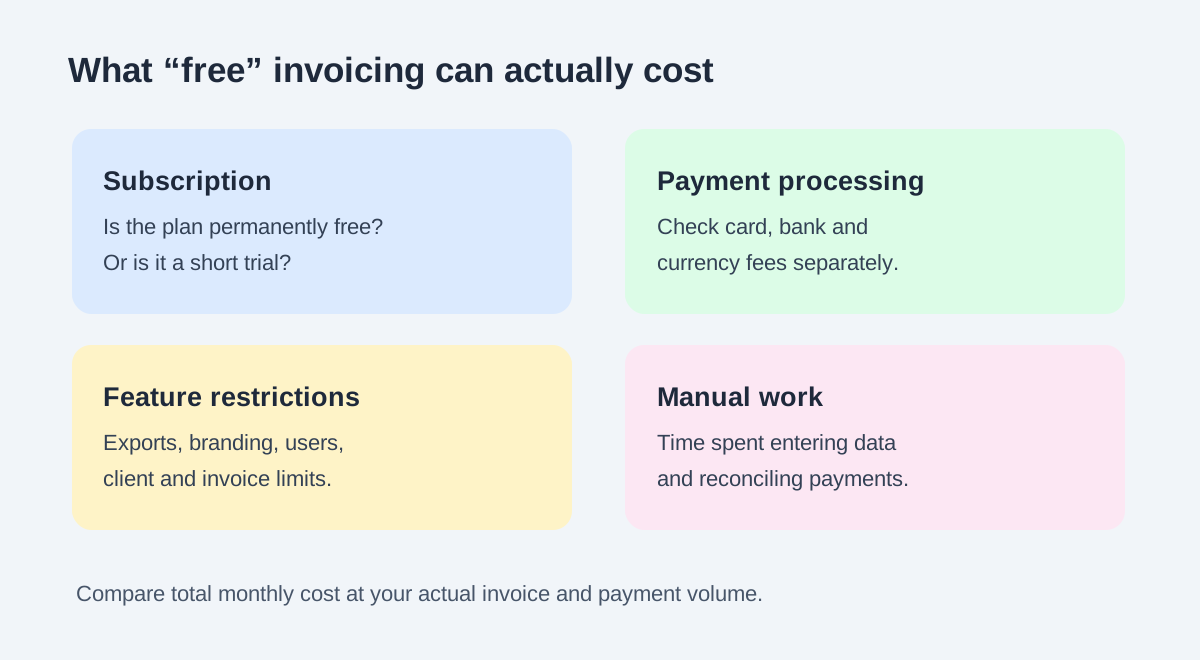
Your total cost includes the subscription, payment processing, and any paid features required by your workflow. Compare invoicing software for small businesses using your expected billing volume and payment mix.
Free Plans vs. Paid Plans: Check Invoice, Client, and User Limits
You should assess free invoicing software against a normal month of business activity. Count the invoices you send, the active customers you bill, and the people who need access.
If a plan advertises unlimited invoices, inspect its other allowances. You still need to check whether estimates, additional users, exports, or reminders require an upgrade. Compare the published ongoing price with any introductory offer before committing.
Payment Processing Fees and Other Costs Beyond the Subscription
You pay for online collection separately whenever your payment provider applies transaction charges. Review card and bank-payment rates, plus any fixed charge per transaction.
Use this calculation for your own volume:
Estimated monthly cost = subscription + percentage-based processing fees + per-transaction charges + applicable extras.
Check for cross-border fees, currency conversion, disputes, and optional faster payouts. Also confirm how refunds affect the original payment processing fees, since the provider’s terms determine your cost.
ProInvoice Pricing: Free Basic Invoicing or Pro at $28 per Month
You get free basic invoicing with ProInvoice. If you need estimates, deposits, and online payments, the Pro plan is priced at $28 per month.
Choose your plan around the work you intend to perform. Basic invoicing gives you a starting point for customer billing; Pro supports the quoted-service workflow described above. You need a connected payment account for online payments, so include that provider’s applicable charges in your budget.
How Can You Test the Estimate-to-Payment Workflow?
You should run one representative job through the entire billing process before moving your live customer records. Use the same amounts in every candidate app so you can compare calculations and manual steps consistently.
Build an Estimate With Labor, Materials, and a Deposit
Start with a clearly labeled sample estimate containing labor of $800 and materials of $200. For this example, use a $1,000 total before any applicable tax and request a $300 deposit.
Enter your customer’s billing details and describe the work precisely. Check the arithmetic after changing a quantity or unit price. In ProInvoice, your estimate supports services, materials, quantities, prices, deposits, and customer details, giving you the fields needed for this exercise.
Convert Approved Work Into an Invoice With Clear Payment Terms
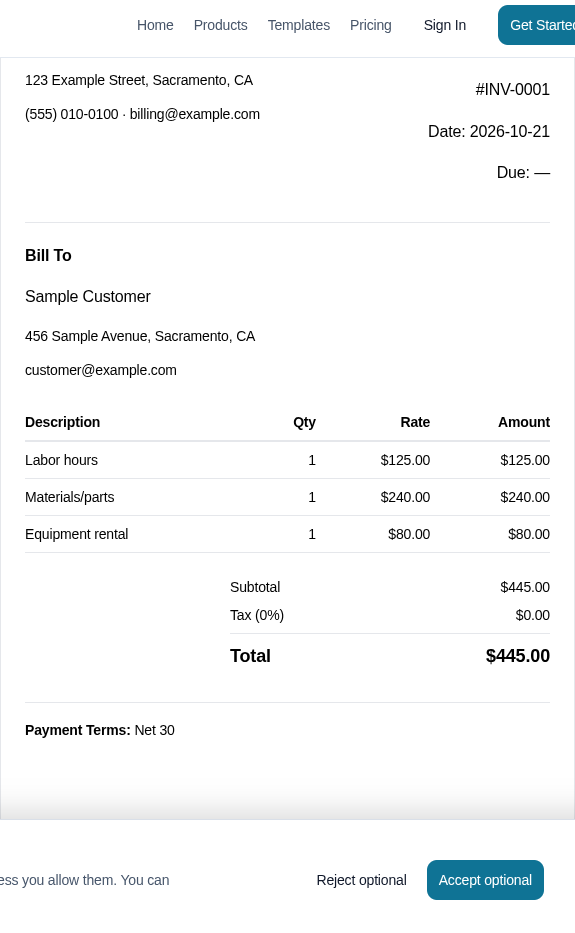
After recording approval, use estimate-to-invoice conversion and compare the resulting invoice with the approved scope. Check each line amount and make sure your payment terms identify when the balance is due.
If your sample includes a collected $300 deposit, verify how you account for it against the $1,000 job total. Your records should show a $700 remaining balance before applicable adjustments. Also inspect how you document approved changes without billing the same work twice.
Connect a Payment Account and Check Deposit and Balance Collection
Connect your payment account before evaluating the customer’s online payments experience. With ProInvoice, that connection is required to collect deposits and remaining balances through payment links.
Use a provider-supported test mode where available, or review the permitted procedure for a small live transaction. Check how invoice payments, processing fees, and payouts appear in your records. Confirm that your customer sees the correct amount owed after each payment.
Choose the App That Matches How You Quote and Get Paid
Choose ProInvoice if your priority is carrying quoted service work through to deposits and final payment. If your billing begins with tracked hours, review FreshBooks or Harvest; if you combine invoicing with in-person sales, give Square Invoices a close look.
Your choice of the best invoicing software should also account for your bookkeeping setup. QuickBooks Online, Xero, and Zoho Books belong on your shortlist when you want billing within your accounting platform.
Before paying for invoicing software, complete the sample workflow and calculate your expected monthly cost. To choose the best invoicing software for small businesses like yours, verify the remaining balance after a deposit and review the invoice from your customer’s phone.
Explore ProInvoice invoice templates, estimate templates, or start free to test the workflow yourself.
Frequently Asked Questions
You can narrow your choice by checking free-plan scope, phone usability, and the relationship between invoicing and accounting. Use the answers below to resolve those specific purchase questions.
What is the best free invoicing app for a small business?
If you need basic customer billing, ProInvoice is a strong free invoicing app to consider. You get free basic invoicing, while estimates, deposits, and online payments are included in Pro at $28 per month.
Which invoicing app is easiest to use on an iPhone?
Your easiest-to-use option is the app that lets you complete your usual invoice comfortably on your iPhone. Try the same task in two shortlisted invoicing apps, checking keyboard entry, document preview, and sending before choosing.
Can I collect deposits and final payments with an invoicing app?
Yes, you can collect deposits and remaining balances online with ProInvoice’s Pro plan. You need a connected payment account, and you should verify that each payment is reflected correctly in the amount still owed.
Do I need accounting software or just an invoicing app?
You need an invoicing app when your immediate goal is creating bills and managing customer payments. Choose accounting software when you also need bookkeeping functions such as bank reconciliation and financial statements, and confirm your setup with your accountant.
Does free invoicing software charge fees for online payments?
You should expect payment processing fees when the connected provider charges for online transactions, even if your invoicing subscription is free. Check the rates for your payment methods and include any fixed transaction charges when estimating collection costs.