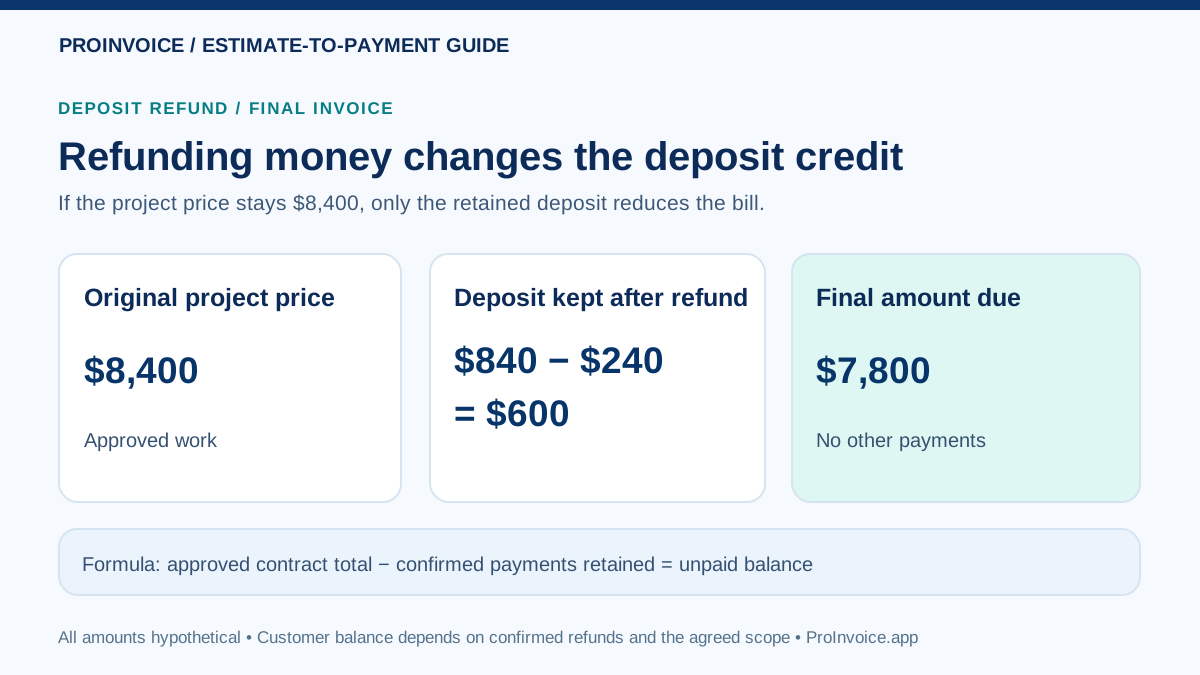
Quick answer: After refunding part of a contractor deposit, calculate the net deposit still held, then subtract that confirmed net amount from the latest agreed project price. A refund and a change to the work scope are different events: one changes the payment credit; the other changes what the customer owes for the job. Do not send the final invoice until you have checked the refund's actual status, the signed contract and every previously applied credit.
Why a Deposit Refund Changes the Final Invoice
When a homeowner pays in advance, their successful deposit is a credit toward the job. If you return part of it, the amount of advance money you still hold is smaller. That can make the unpaid balance larger than it was before the refund even though you have not increased the contract price. This is correct accounting arithmetic, but it is easily misunderstood without a clear explanation.
The safest invoice shows the agreed work price, approved changes, money previously received, money actually returned and the remaining credit. Keep the original deposit receipt and a separate refund confirmation with non-sensitive transaction references. If you previously credited a deposit against an earlier invoice, reconcile that accounting entry instead of applying the same credit again.
This guide is about adjustments to a legitimate, still-active contractor job. Cancellation rights, tax obligations and contract remedies vary by jurisdiction and must be reviewed separately rather than guessed from a receipt label.
The Four Figures You Need Before Editing Anything
- Latest approved contract price: The signed original agreement adjusted by any properly approved scope changes. Do not use an abandoned estimate or an unapproved change request.
- Confirmed gross deposit received: The actual successful customer payment, not the amount you originally requested and not the smaller processor payout after fees.
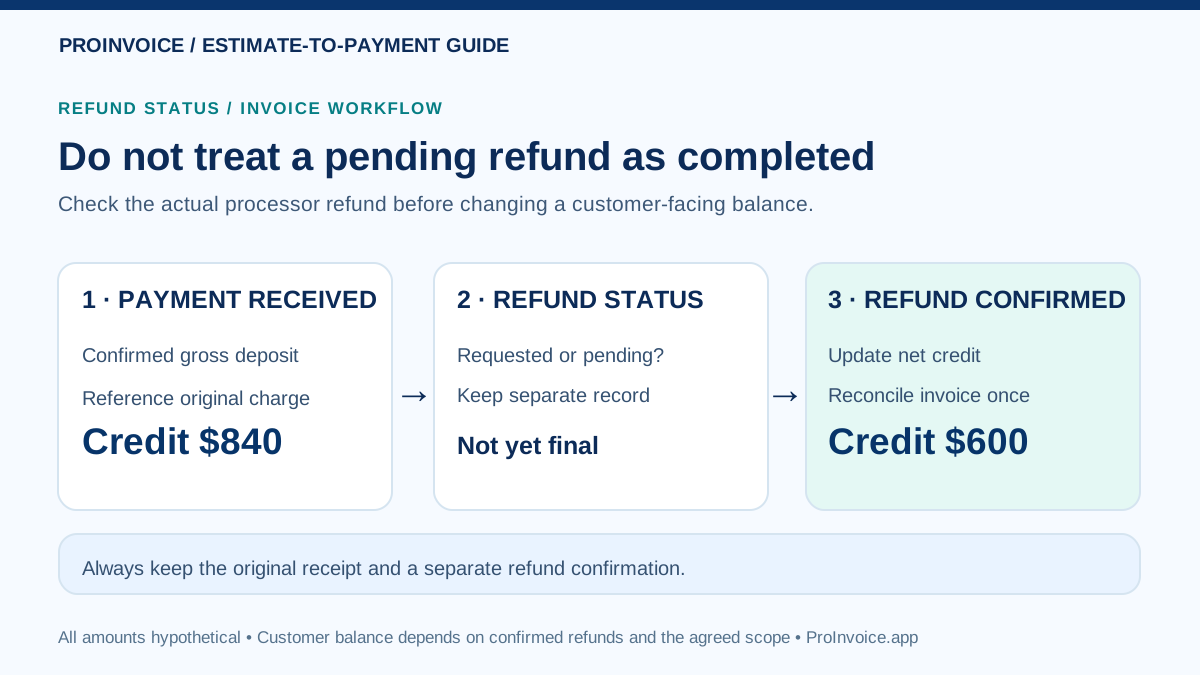
- Confirmed refund completed: The amount actually returned to the customer. Record a refund that is requested or pending separately until the provider's status supports final treatment.
- Net deposit credit retained: The earlier confirmed gross deposit less refunds or reversals actually completed, adjusted for any other legitimate credits already applied.
Formula for a job with no other payments: Final amount due = latest approved project price − net retained deposit credit. If there are more successful progress payments, credits or refunds, reconcile all of them once before sending the final bill.
For the related terminology, see the contractor deposit-invoice versus final-invoice guide and the partial-deposit payment ledger example.
Worked Example A: You Refund $240, but the Work Is Unchanged
Hypothetical covered California home-improvement job: The signed contract price is $8,400 and the contractor lawfully received an initial $840 deposit (10% of $8,400, below the general $1,000 cap). The contractor agrees to refund $240 of that payment without changing the work, and the refund has actually completed. No other payments or credits have been posted.
| Record | Amount | Meaning |
|---|---|---|
| Signed contract total | $8,400 | Price of approved work |
| Successful deposit originally received | $840 | Original customer credit |
| Completed refund to customer | −$240 | Money returned, no longer retained as an advance |
| Net retained deposit credit | $600 | $840 − $240 |
| Final balance due | $7,800 | $8,400 − $600 |
Before the refund, the ordinary unpaid contract balance would have been $8,400 − $840 = $7,560. After returning $240, the unpaid amount becomes $7,800 if the job and terms are otherwise unchanged. The customer has not been charged an unexplained extra $240; they simply no longer have that $240 advance on account. A final invoice should say this explicitly.
The general California home-improvement initial down-payment cap is the lesser of 10% or $1,000 for covered contracts, with narrow statutory exceptions. See the California Contractors State License Board contract guide. This does not establish a universal national refund policy.
Worked Example B: The Homeowner Also Approves Less Work
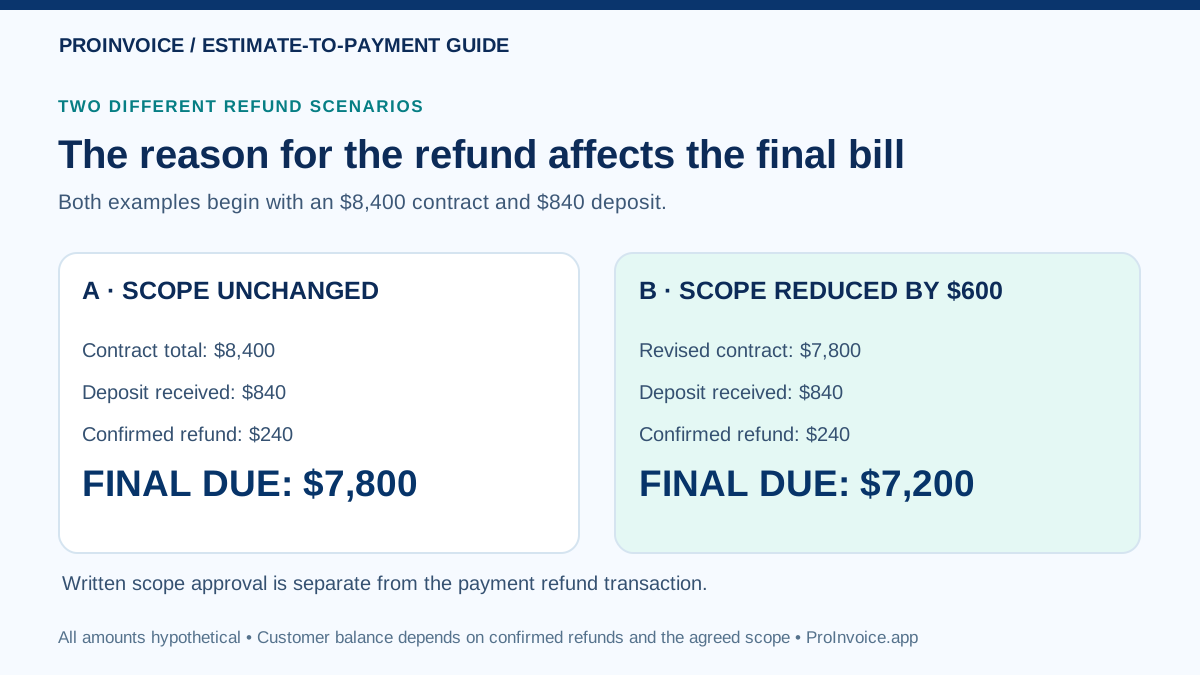
A scope reduction is a separate contractual change and must not be confused with the movement of money. Suppose the same homeowner and contractor approve a written change order removing $600 worth of work. The new agreed contract total becomes $8,400 − $600 = $7,800. The contractor still returned only $240 of the original $840 deposit, leaving $600 retained.
| Item | Scope unchanged | Scope reduced by $600 |
|---|---|---|
| Contract price after approved changes | $8,400 | $7,800 |
| Successful advance received | $840 | $840 |
| Confirmed refund | −$240 | −$240 |
| Net credit retained | $600 | $600 |
| Final amount due | $7,800 | $7,200 |
In the second column, the customer owes less because $600 of agreed work was removed—not because the deposit refund was treated as a second discount. Both examples are hypothetical and assume the work is completed under the revised contract with no other payments, credits, taxes or disputes.
Preserve the dated, signed written change where applicable; covered California home-improvement contracts require changes to scope or price to be documented before changed work begins. Review pricing and approving optional contractor upgrades for the opposite kind of scope change.
When the Customer Cancels Instead of Completing the Job
A canceled job may not have a normal final invoice for completed work at all. First establish whether the customer had a statutory cancellation right, what services were lawfully performed, whether any materials were actually delivered, what the written contract says and what funds are refundable. A contractor cannot decide to keep a deposit merely by labeling it “nonrefundable” or pointing to a special-order supplier invoice.
For covered California home-improvement work, the CSLB describes required cancellation notices, deposit limits and progress-payment restrictions. Other contracts and states have their own rules. A complete or partial refund may be due, but the entitlement must be established under the actual contract and law; there is no simple universal formula saying “keep all documented material costs.”
If the project ends, provide a clear cancellation or final accounting statement: contract ID, lawful amounts for work actually performed if any, received payments, refunds and balance if justified. Do not present unperformed services as completed. If the matter is disputed, obtain qualified local advice before asserting collection or lien rights.
Refund Requested, Processing or Completed: Use the Right Status
A customer can be told “we initiated the refund” before their account shows the money. Stripe documents distinctions among refunds that are pending, refunded, reversed and partially refunded. The precise processing and bank presentation can differ by payment method and provider; do not promise a fixed delivery date or treat a request as money already returned.
| What happened | What is verified? | Safe billing action |
|---|---|---|
| Refund only discussed | No refund transaction confirmed | Document the agreement; do not change paid credits as if money moved |
| Refund submitted, pending | Refund attempt exists; final outcome unresolved | Show pending separately, check provider and avoid claiming the final return is complete |
| Refund confirmed completed | Actual returned amount and original charge match | Adjust net retained credit and invoice amount once |
| Refund failed or canceled | Customer may not have received the return | Investigate and reconcile before promising a balance or issuing another return |
| Bank payout delayed | Merchant bank transfer timing is separate | Do not confuse your payout delay with customer refund or invoice status |
Check the provider's refund-status guidance and the original payment ID. If an invoice must be shared while a refund is unresolved, state that the balance is provisional and explain when an updated statement will follow. Avoid simultaneous payment links with contradictory amounts.
A Voluntary Refund Is Not the Same as a Chargeback
A voluntary refund is a merchant-initiated return of a particular payment. A chargeback or payment dispute follows a separate process involving the payment provider and card issuer, and may result in holds, debits, evidence requests or fee adjustments. It is dangerous to assume a bank dispute has the same status or finality as an approved refund.
If a homeowner opens a dispute after a refund was already initiated, check the original charge, refund ID and dispute case in the merchant dashboard before issuing anything else. Duplicate refunding or treating a provisional dispute debit as a settled permanent return could distort the project ledger. Do not send a new payment demand until the contractual balance and dispute outcome have been reviewed.
Provider fee treatment depends on the payment agreement. Do not advertise that refunds are always free or that chargebacks always carry the same fee. The customer payment and merchant processor costs must remain separate in the accounting records. See reconciling invoice processing fees and payouts.
Avoid Crediting the Same Deposit Twice
Two different accounting workflows can describe the same economic event. Your invoicing program may apply $840 as an original customer payment, then record the $240 refund as a reversal or adjustment, leaving $600 of net applied payment. Another bookkeeping system might first hold the $840 as a liability, then release only the remaining $600 against earned invoices. Either way, the final customer balance must agree with the underlying payment record.
- Find the actual confirmed gross deposit and its original transaction reference.
- Find each completed refund or reversal linked to that same payment.
- Check whether the original deposit is already applied to an invoice or recorded separately as a customer advance.
- Compute the net remaining credit and match it to the correct job once.
- Check for extra negative “deposit credit” line items that would subtract money already applied as a payment.
- Verify the resulting unpaid balance against the latest signed contract and any other successful progress payments.
Do not assume the action called “credit memo” always means the same thing in every product. A credit memo may reduce invoice consideration, whereas an actual refund returns cash; the system might need different records for each. Consult a qualified bookkeeper to prevent double counting revenue or customer receivables.
Compare the Document Types Before Editing the Final Bill
Intuit's current deposit-refund guidance provides program-specific steps for refunding a deposit or closing an invoice, while FreshBooks' payment-refund instructions describe its own workflow. These are useful examples of why a refund, credit memo and original invoice may be different records, not directions to click the same buttons in ProInvoice.
| Record | What it establishes | What it does not establish |
|---|---|---|
| Signed agreement / change order | Latest approved work and price | That payment was successfully collected or refunded |
| Deposit receipt | Gross advance payment actually received | That the job has been completed |
| Refund confirmation | Amount returned and its payment reference | That the underlying contract was reduced |
| Credit memo or adjustment | Bookkeeping change according to chosen software | That the payment provider transferred money automatically |
| Final invoice | Amount now owed after scope and credits | That an earlier pending refund is already complete |
When a refund also corresponds to a changed price, keep the signed scope adjustment distinct from the refund confirmation. Never erase an earlier paid receipt merely to make a later total look simpler.
Customer Messages and Ledger Notes You Can Adapt
Message 1: Refund confirmed, work unchanged
Subject: Deposit refund confirmation for [Project ID]
Hello [Customer], we have confirmed that $240 from your original $840 deposit was returned through [Payment method] under refund reference [ID]. The project price remains $8,400. The advance remaining on your account is $600, so the final balance, assuming no other payments or agreed changes, will be $7,800 when due under our contract. Please reply if you need the transaction reference or a revised account statement. Thank you, [Business].
Message 2: Final invoice after an approved scope reduction
Subject: Revised final invoice for [Contract ID]
Hello [Customer], your signed scope adjustment removed $600 of work, updating the contract total from $8,400 to $7,800. We originally received an $840 deposit and have confirmed a $240 refund. The remaining deposit credit is therefore $600. Your final amount due is $7,200 ($7,800 revised price minus $600 net credit), assuming no other payments. Please review [Verified invoice link] and let us know if any line is unclear. [Business contact]
Message 3: Internal bookkeeper note
Job [ID] — refund reconciliation
Original contract $8,400. Deposit charge [Payment ID] succeeded for $840. Completed refund [Refund ID] $240. Net retained payment credit $600. Separately approved written scope reduction [Change order ID] $600; revised contract $7,800. Final amount due before any additional payments: $7,200. Verify that the $600 credit was applied only once and the refund isn't also recorded as a second contract discount. Merchant fees and bank payouts reconciled separately.
All names, dates, addresses and payment references are placeholders. Use the actual amount and verified refund state from your records. Do not send a “confirmed” refund message while the processor only says pending.
Customer-Facing Reconciliation Checklist
- Confirm the original agreement and the latest signed scope, price and any customer rights affecting the project.
- Open the customer transaction record and record the gross deposit actually received.
- Find the real refund transaction ID and distinguish a request from a completed refund.
- Check for any other deposits, progress payments, discounts, returned payments or credits.
- Compute net retained payment credit and current contract price independently.
- Make sure the customer hasn't already received a credit for the same amount on an earlier invoice.
- Show the final balance with clear labels and a short explanation of how it was calculated.
- Confirm that any new payment link asks only for the actual amount owed.
- Provide a receipt or refund confirmation appropriate to the provider; keep sensitive payment data out of customer emails.
- Retain the signed change order, refund confirmation and final invoice with the job ledger.
For a more complete documentation template, consult the home-improvement deposit receipt guide and the article on how to show an advance payment on a final invoice.
Frequently Asked Questions
If I refund $240 of an $840 deposit, how much do I credit?
If the refund actually completed and there are no other adjustments, the credit remaining is $600. Apply it once to the correct job. If the agreed scope has not changed, the final bill uses the original project price.
Why did my final amount due increase after I refunded money?
Returning part of a deposit reduces the prepaid balance. On the $8,400 unchanged contract in our hypothetical example, the unpaid amount changes from $7,560 before the refund to $7,800 afterward. It isn't a price increase; the customer now holds the $240 that was previously on account.
Does reducing the work automatically refund money?
No. A signed scope change adjusts the contract total. A separate financial transaction returns money. Show both events with their own evidence.
Can I keep a deposit if the homeowner cancels before the job starts?
Not automatically. Cancellation rights and permitted retention depend on the governing law, mandatory notices, facts and written contract. Do not assume that a material order or a “nonrefundable” label decides the amount.
Should a pending refund already reduce the confirmed payment credit?
Track it as pending and reconcile when the outcome is known. If billing must occur before completion, clearly explain the provisional status and avoid conflicting payment requests. Your accounting policy may require a separate pending-liability entry.
Do card fees reduce how much the homeowner paid?
Ordinarily, no: the customer gets credit for the successful gross payment, and the fee belongs in the merchant's separate reconciliation. Any lawful fee passthrough arrangement requires its own verified terms and legal review.
Is a chargeback the same as a refund?
No. A disputed payment may create a separate provider/issuer process and can later be reversed. Review the actual status before making permanent customer-ledger adjustments.
Does ProInvoice automatically process deposit refunds?
Do not assume a native refund control or accounting automation. Check the features enabled in your ProInvoice account and the merchant provider's actual refund workflow; preserve the transaction reference regardless of software.
How to Put the Correct Balance on an Invoice
ProInvoice supports preparing estimates and invoices and requesting supported online payments through a properly configured merchant account. For a final bill after a refund, the crucial work is verifying the latest agreed total and the actual advance money still credited. Use any native feature confirmed in your account, or prepare a clear manual statement when needed; do not assume a particular refund, credit-memo, electronic-signature or accounting integration exists.
Separately, customer payment success and your later bank payout are different stages. The original deposit may already have reached your bank even while the provider handles a separate refund transaction.
Before sending: recalculate the amount owed from the contract and the confirmed customer-ledger events, check the actual online payment request, and make the written explanation understandable enough that the homeowner can reproduce the math.